Featured In
Connect Freight Right MCP to ChatGPT and manage freight directly from the chat you already use. Get freight quotes, check shipment status, upload shipping documents, request custom pricing, and start bookings using plain language. Freight Right MCP connects ChatGPT to Freight Right’s logistics tools so you can handle common freight tasks without moving between multiple systems






Use ChatGPT to work with Freight Right for day-to-day logistics tasks including:
Freight quoting
Shipment tracking
Container status
Shipment exceptions
Packing list uploads
Custom quote requests
Freight option comparison
Booking requests
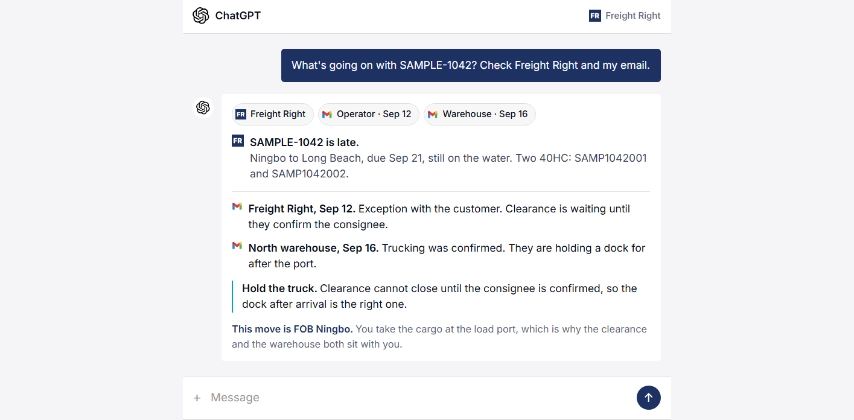
Ask what is happening with a shipment and get more than a tracking update. Freight Right can combine live shipment information with relevant emails from your operators, warehouses, or other parties so you can see what changed, why it happened, and what needs to happen next.
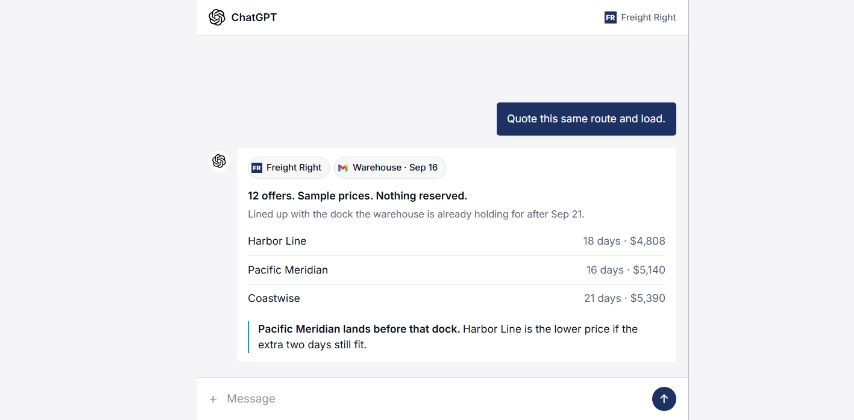
Once the shipment details are already in the conversation, ask Freight Right to price the same route and load. The system can reuse the cargo details, timing, and other available context to return relevant freight options without making you start a new quote from scratch.
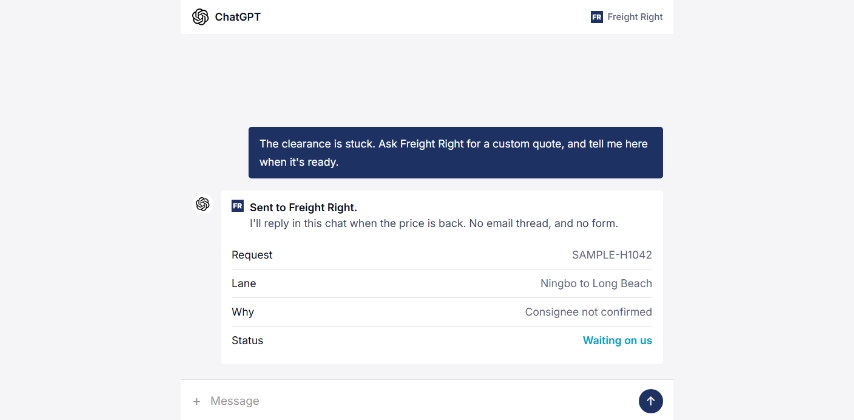
Not every shipment can be priced instantly. If a quote needs manual review, ask for it in the conversation. Freight Right receives the request, works the quote, and sends the result back through the same chat when it is ready.
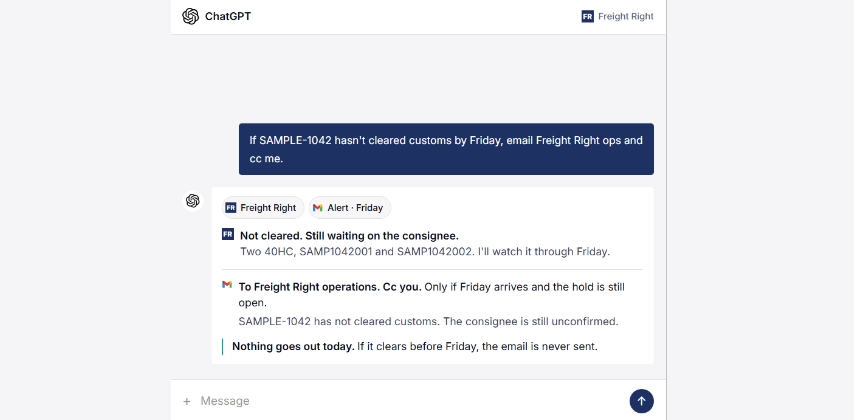
Tell the assistant what to watch for and what to do if something does not happen by a certain time.
For example: if a shipment has not cleared customs by Friday, notify Freight Right operations and copy me.
If the shipment clears before then, nothing happens. If it is still held at the deadline, the alert goes out automatically.
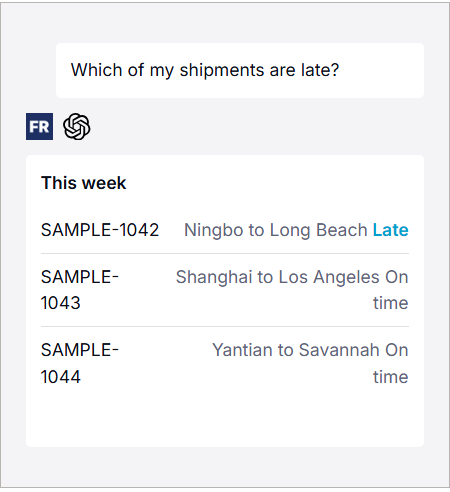
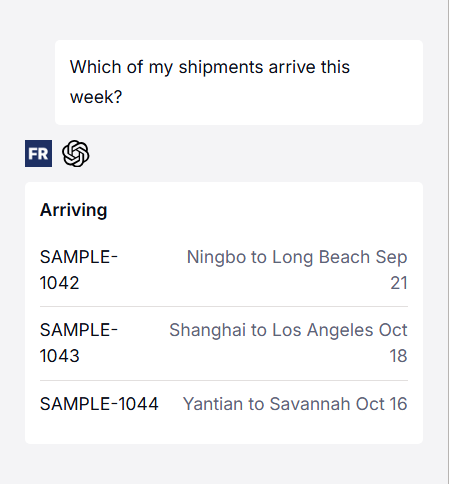

Ask where a shipment is, which shipments are late, or what is arriving this week.
Freight Right can return current shipment information while ChatGPT uses the context available in the conversation to help explain what is happening.
Examples:
Where is my shipment?"
"Which shipments are late?"
What arrives this week?"
"Which containers are still on the water?"

Ask ChatGPT to price a lane or quote a shipment using the information already available in the conversation.
Freight Right can use shipment details such as the route, load, timing, and service requirements to return available pricing.
Examples:
"Price two 40-foot containers from Ningbo to Long Beach."
"Quote this same route and load."
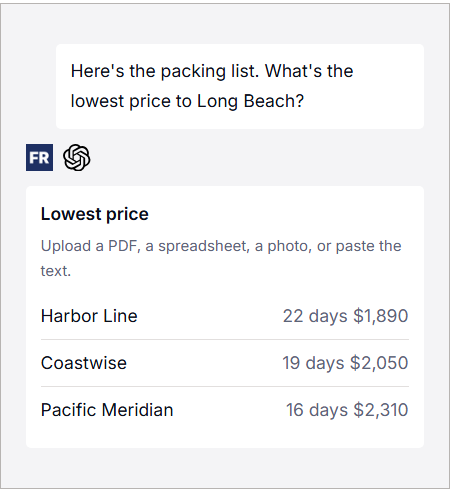
"Show me the lowest-cost option."

If the shipment information already exists in a packing list, commercial invoice, spreadsheet, or other shipping document, upload it to ChatGPT.
Freight Right MCP can use the shipment details available in the conversation to help build the quote request without requiring you to enter the same information again.
Example:
"Here is the packing list. What is the lowest price to Long Beach?"
Some shipments require manual pricing.
If an instant rate is not available, ask ChatGPT to send the request to Freight Right. The Freight Right team can review the shipment and return the quote through the same workflow.
No separate form or new email thread is required.
Example:
"This shipment is complicated. Ask Freight Right for a custom quote and tell me here when it is ready."

Use ChatGPT to check shipment status and identify freight that needs attention.
Ask about delays, customs status, arrival dates, or other shipment exceptions.
Examples:
"Has this shipment cleared customs?"
"Which shipments need attention?"
"Which containers are still moving?"

Freight Right MCP can also support shipment follow-up based on a condition or deadline.
For example:
"If SAMPLE-1042 has not cleared customs by Friday, email Freight Right operations and copy me."
"If the shipment clears before the deadline, no action is required. If the issue is still open, the requested follow-up can be triggered."

Once you select an available freight option, ask ChatGPT to start the booking process.
Freight Right prepares the booking and provides the next step for review and confirmation.
Nothing is booked until you approve it.
Example:
"Book the TForce Freight option."

Freight Right supports logistics across ocean, air and ground transportation.
The AI interface gives shippers one way to start across different freight modes.
Ocean Freight
"Price one 40-foot container from Shanghai to Los Angeles."
Air Freight
"Quote this 780 kg shipment from Frankfurt to Boston."
LTL
"Price three pallets from Chicago to Dallas."
FTL
"Quote a dry van from Laredo to Atlanta next Thursday."
Complex Freight
"Here are the dimensions and photos. Ask Freight Right for the best way to move this."
Connecting Freight Right to ChatGPT takes a few steps.
In ChatGPT, open Settings, then Connectors, then Advanced, and turn on Developer mode. You do this once.
Choose Create. Paste the connector URL and set authentication to OAuth:
https:Sign in using your existing Freight Right credentials and approve the connection.
ChatGPT does not receive your Freight Right password.
Open a conversation, enable Freight Right, and ask about a shipment, freight quote, or booking.
Can I manage freight with ChatGPT?
Yes. Once Freight Right MCP is connected, ChatGPT can be used to access supported Freight Right logistics capabilities, including quoting, tracking, shipment lookup, and booking workflows.
Can I get a freight quote with ChatGPT?
Yes. Describe the shipment in plain language or upload available shipment information. Freight Right can return available pricing or route the request for manual pricing when needed.
Can I book freight with ChatGPT?
Yes. You can ask ChatGPT to start a booking based on an available Freight Right quote. The booking is reviewed and confirmed through Freight Right before it is finalized.
Can ChatGPT track my freight?
Yes. For shipments available through the connected Freight Right account, you can ask about shipment status, delays, arrivals, and other shipment details.
Can ChatGPT read a packing list?
Yes. ChatGPT can work with uploaded shipping documents, and Freight Right MCP can use the relevant shipment details available in the conversation to support a quote request.
Do I need an API key?
No. Freight Right MCP uses your Freight Right account and OAuth authentication.
Do I need to understand MCP?
No. MCP is the connection between ChatGPT and Freight Right. You can simply ask for the freight information or action you need.
Does ChatGPT get my Freight Right password?
No. Authentication happens directly through Freight Right.