Freight Right Adds Billing, Customs and Documents to Its MCP and API
Until now, AI assistants connected to Freight Right could see how many milestones or containers a shipment had, but not their details. Billing, customs and documents were also available only in Shipment Manager.
Based on customer feedback, we've expanded the Freight Right MCP and API to make more shipment data available outside the web app. The update is live on the Freight Right MCP server and the public Shipment Visibility API. Your existing Shipment Manager permissions still apply.
More Complete Shipment Details
A few things customers told us were missing are now fixed:
Shipment records: View milestones, routes, containers and parties, not just their totals.
Shipment status: See the current shipment status and delivery state.
Quotes: View pricing for quotes created in Shipment Manager, not just those made through the API.
Organizations: Each organization now has a unique ID. This makes it easier to tell apart entities with similar names and see which one owns a quote, booking or shipment.
Container contents: View package counts, types, descriptions, weight and volume. Purchase order details also show which PO belongs to each container.
Container availability: See the last free day and pickup availability date when recorded. This helps you plan ahead and avoid demurrage and detention fees.
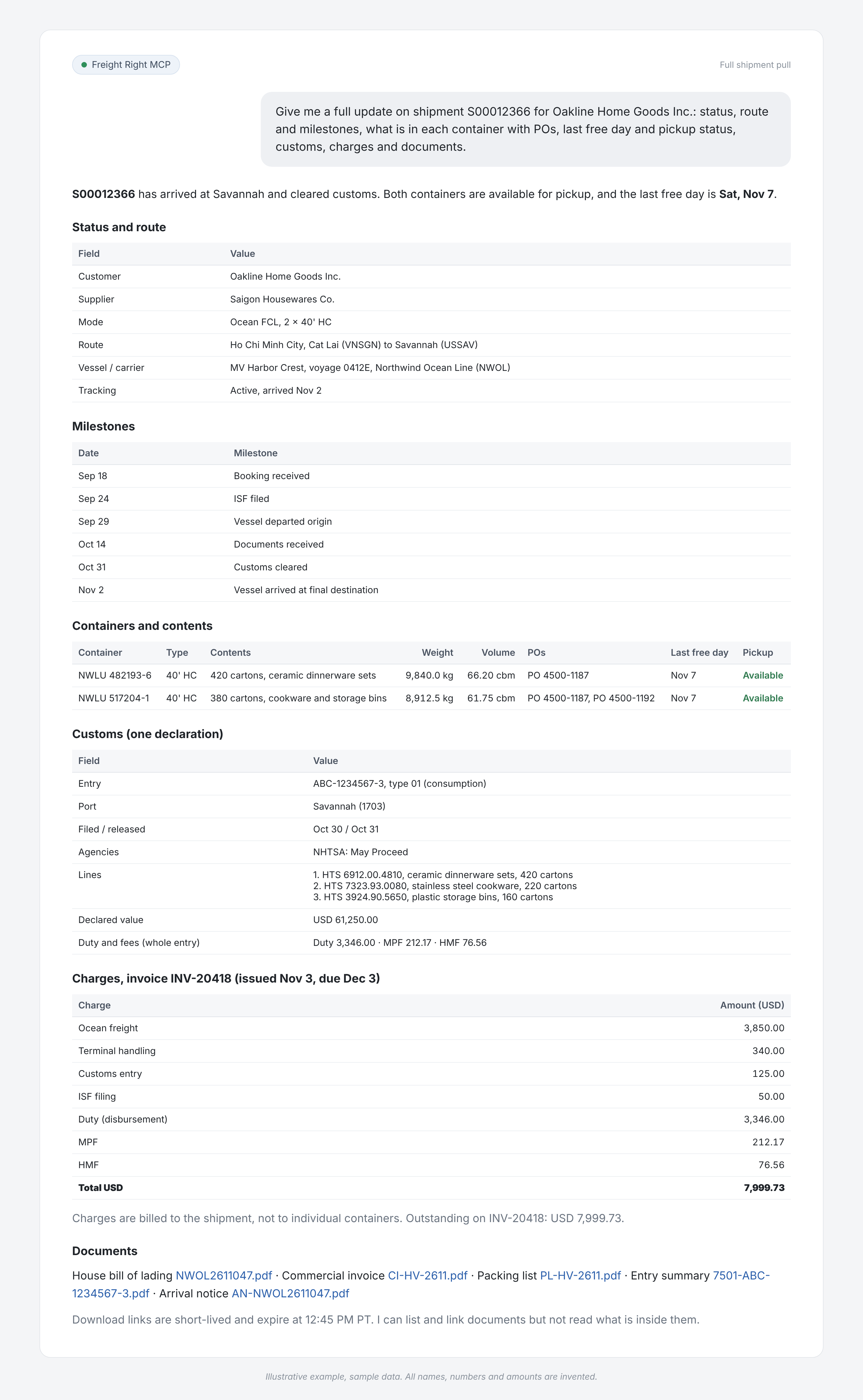
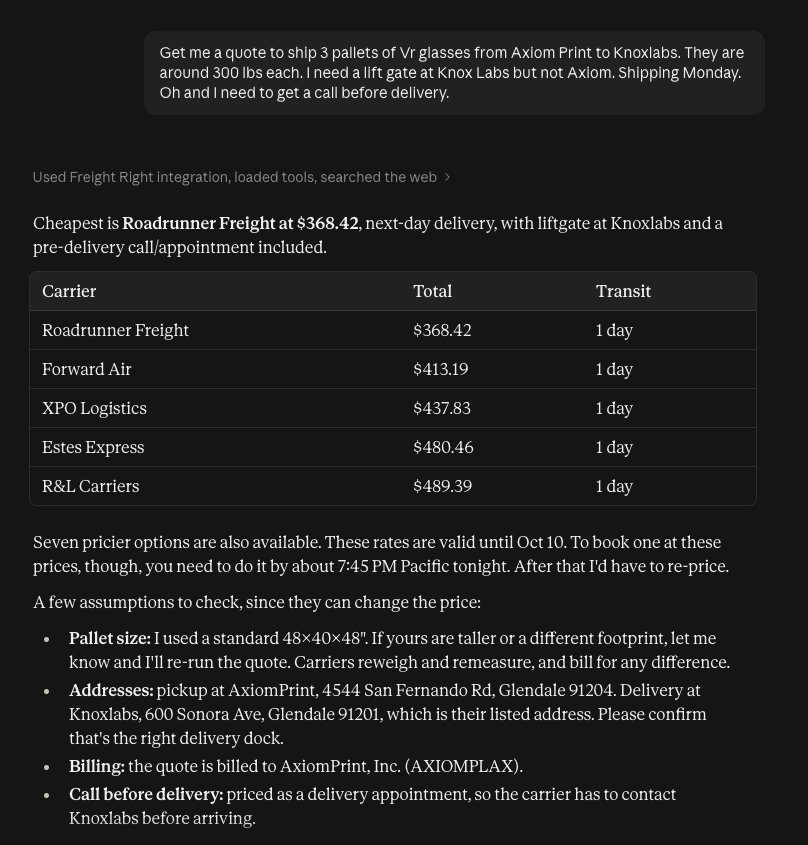
Calling Freight Right MCP for Full Shipment Update
Five New Ways to Access Shipment Data
Five new capabilities are available through both the API and the MCP:
Billing and invoices. View shipment invoices with each charge, including its code, description, quantity, unit price, amount and tax. You can also see issued accounting invoices, totals, balances due, payment status and PDF links. Review open or paid invoices across shipments. All amounts are customer prices, shown by currency.
Customs records. View customs entries with their type, dates, ports, broker reference, declared value, duties, fees and agency status. Each entry also includes invoice details, HTS codes, part numbers, quantities, extended prices and countries of origin.
Shipment documents. List and download documents available in Shipment Manager, such as commercial invoices, packing lists, bills of lading and entry summaries. Download links expire after a short time.
Shipment changes. Check an events feed for shipment updates. These include new milestones, ETA changes, arrivals, deliveries, last free days, pickup availability, new documents and invoice activity.
Purchase order discrepancies. Ask your assistant to prepare a request when a container's actual quantity differs from its purchase order. The request includes the shipment, container, PO number, SKU, and expected and actual quantities. Freight Right's team reviews the request before making any changes to the shipment record.
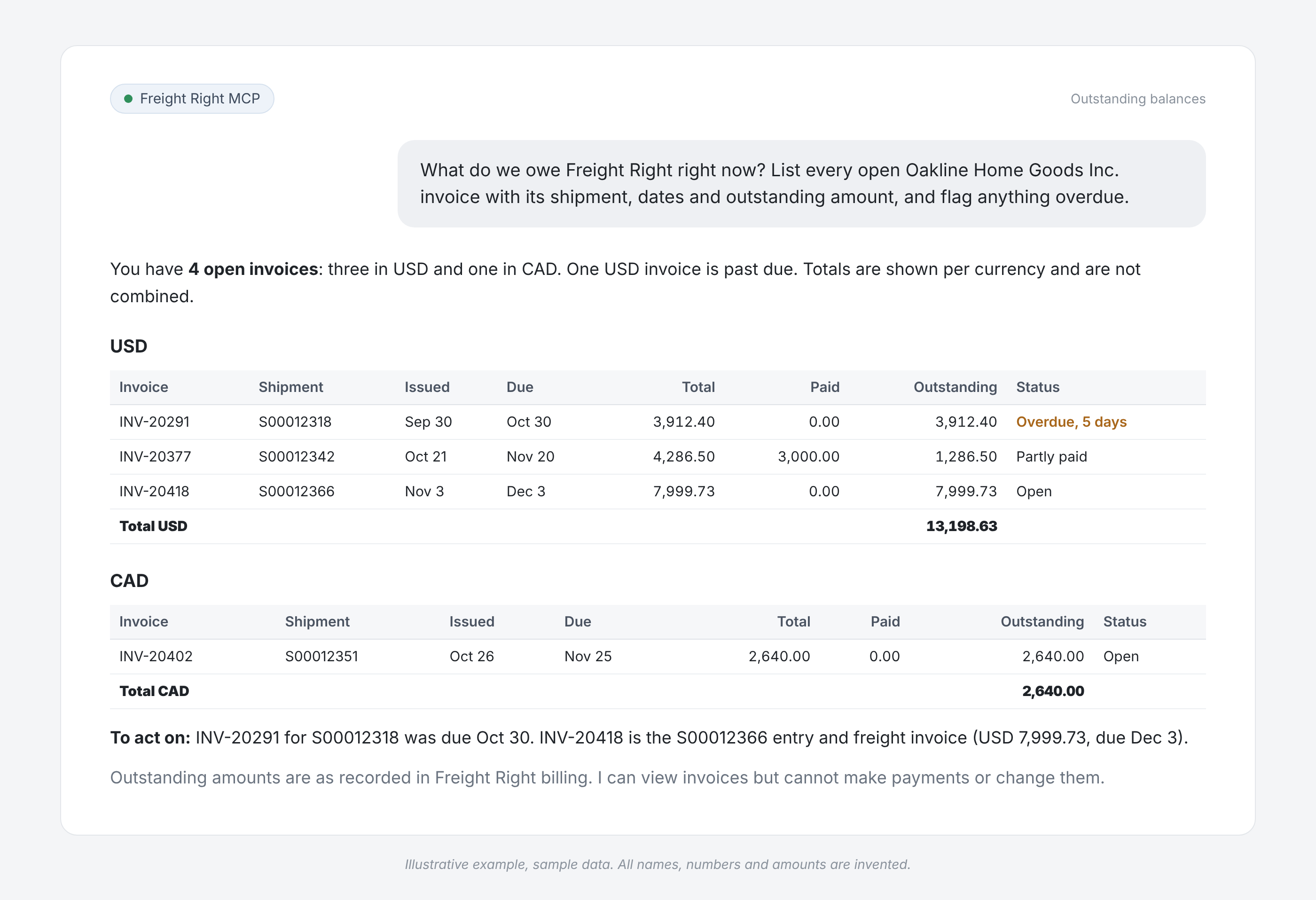
Calling Freight Right MCP for Checking Outstanding Balances
In practice, that means you can ask your assistant questions like:
"Which containers on this shipment carry PO 1234?"
"What's the last free day for my container? Is it ready for pickup?"
"Show me the charge lines on the invoice for this shipment."
"Which invoices are still unpaid, and how much do I owe?"
"What duty and fees were declared on the customs entry for this shipment?"
"Pull the bill of lading and packing list for this shipment."
"What changed on my shipments since yesterday?"
"Show me the pricing on the quote my team created in Shipment Manager."
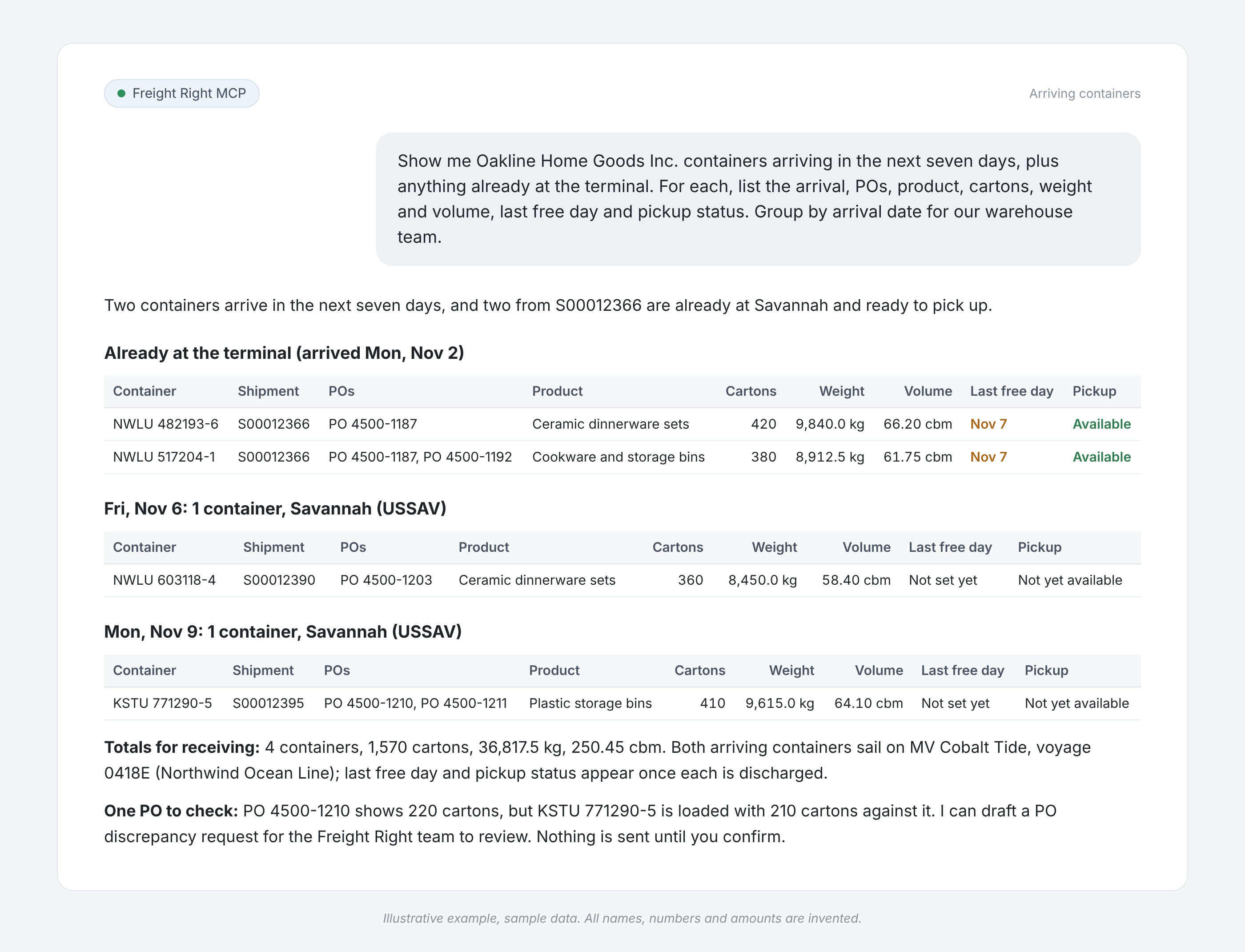
Calling Freight Right MCP for Arriving Containers
Your Existing Permissions Still Apply
The MCP and API follow the same access rules as Shipment Manager. If you cannot view something in Shipment Manager, you cannot access it through the MCP or API.
Billing: You can only view invoices billed to organizations your account is allowed to access. Being listed on a shipment does not give you access to another party's charges.
Pricing: Customers see only their own sell prices. Internal cost data is never shared.
Documents: Hidden or private documents remain restricted.
Billing access: If billing is disabled for your account, you'll receive a clear message instead of an empty result.
Account roles: Customers can access only their organizations.
Automate Tasks With an API Token
You can also use the API without an AI assistant. For example, you can run nightly data syncs, check arrivals or export invoices on a schedule.
These tasks use a personal API token instead of an assistant connection. API access must first be enabled for your account. You can then create a token in Shipment Manager under Account → API Tokens.
The token works with both the Shipment Visibility API and the rates API. It uses the same bearer authentication and follows your account's access permissions.
To check for shipment updates, use the events feed and its cursor instead of requesting the full shipment list each time. The feed stores about 90 days of events.
Billing, customs and documents require separate read-only permissions. You approve these when connecting your assistant. Existing connections will ask for approval the first time you use one of these features.
Automate Tasks With an API Token
You can also use the API without an AI assistant. For example, you can run nightly data syncs, check arrivals or export invoices on a schedule.
These tasks use a personal API token instead of an assistant connection. API access must first be enabled for your account. You can then create a token in Shipment Manager under Account > API Tokens.
The token works with both the Shipment Visibility API and the rates API. It uses the same bearer authentication and follows your account's access permissions.
To check for shipment updates, use the events feed and its cursor instead of requesting the full shipment list each time. The feed stores about 90 days of events.
Current Limitations
Container charges: Invoice charges are linked to shipments, not individual containers.
Customs duties: Duties and fees are available by customs declaration, but not by individual HTS line.
Webhooks: The API does not yet send automatic updates through webhooks. You must check the events feed for changes.
Changes to records: Most features are read-only. PO discrepancy requests go to Freight Right's team for review before any changes are made. The MCP and API cannot pay invoices or accept document uploads.
Document contents: The connector provides download links but does not read or analyze the documents for you.
Get Started
Freight Right MCP is available to all Freight Right account holders. You can add it through the Claude Connectors Directory, Cursor Marketplace or Grok Bot, then sign in with your Freight Right account. New users can create a free account at app.freightright.com.
API access requires approval. To request access, contact your Freight Right account representative or email [email protected]. Once enabled, you can create personal API tokens in Shipment Manager under Account → API Tokens.
Developers can find setup guides and permissions at developers.freightright.com. The Shipment Visibility API reference is available at api.freightright.com/api/public/v1/docs.
We're interested in your feedback. Try these features with your own shipments and let us know if any billing, customs, document or shipment details are missing.
More News
Freight Right MCP Now Available in Grok Bot and Cursor
Freight Right MCP is now available in Grok Bot and Cursor, giving AI assistants access to freight pricing, quote requests, tracking and booking workflows.
Freight Right Product Update: November 2026
This month’s releases span three areas: Freight Right MCP, which connects Freight Right to AI assistants; the Freight Right Shipment Management Platform, where customers quote, book and manage freight; and CartRight, our Shopify freight solution for merch
Freight Right Launches MCP, Bringing Freight Quoting, Tracking and Booking Into AI Assistants
Freight Right MCP connects freight operations with compatible AI assistants, allowing shippers to quote, track, book and manage shipments through a conversational interface

New Partnership Offers Improved Freight Services
Freight Right now offers quality control and production visibility thanks to our most recent alliance.

Looming Tariffs and Softening Volumes Push Ocean Rates Down - TFX Update wk. July 20, 2026
Track weekly ocean freight rate trends for China to USWC and USEC. Read key insights on carrier rate adjustments, tariff updates, and shipping forecasts.

Transpacific Carriers Face Losses as Feb Bookings Close - TFX Update wk. February 2, 2026
Ocean freight rates from China to USWC have hit a breakeven low of $1,450 per container. As the Chinese New Year halts Asian manufacturing, explore why rates are falling, the impact of late-week bookings, and the outlook for March contract negotiation.

Capacity Management & Holiday Rush Drive Transpacific Freight Rates Higher - TFX Update wk. August 31, 2026
Discover why strategic blank sailings and early holiday inventory shipments are driving Transpacific container rates up to $10k per FEU this September

Executive Expands Tariff Powers, Streamlines Trade and Security Framework
In a 7–4 ruling on August 29, 2025, the US Court of Appeals found President Trump exceeded his authority under IEEPA by imposing broad reciprocal tariffs. The decision is stayed until Oct 14, giving the administration time to appeal to the Supreme Court.

CBP Expands IEEPA Refund Access With Phase 2 CAPE Rollout
IEEPA Phase 2 is now implemented, expanding CAPE refund eligibility for certain reconciliation-flagged entries. Learn how Phase 2 differs from Phase 1, who may qualify, and what importers should do next.

Space Tightens on China-US Routes Despite Weak Underlying Volume - TFX Update wk. April 13, 2026
Explore how aggressive blank sailings and new blended rate strategies are stabilizing CEA to USWC/USEC shipping costs despite weak demand. Stay informed on current ocean freight market updates and rate changes.